Under the Hood: How TOTP Works and How TwoFac Generates Your 2FA Codes
In the previous article, I walked through how TwoFac is structured as a Kotlin Multiplatform project. With that groundwork out of the way, we can zoom in on one of the most important pieces in the shared core: OTP generation itself. When you open an authenticator app and watch a 6-digit code ticking down, it's easy to treat it as magic and move on. But there's some genuinely elegant cryptography behind that little countdown. In this post, I'm going to pop the hood on TOTP — Time-based One-Time Passwords — unpack the math, walk through the RFCs, and then show how we implement it in TwoFac.
Note: This post focuses only on OTP generation — how we take a shared secret and turn it into those familiar 6-digit codes. How we store secrets securely (PBKDF2, AES-GCM, the
accounts.jsonfile) is a story for the next post.
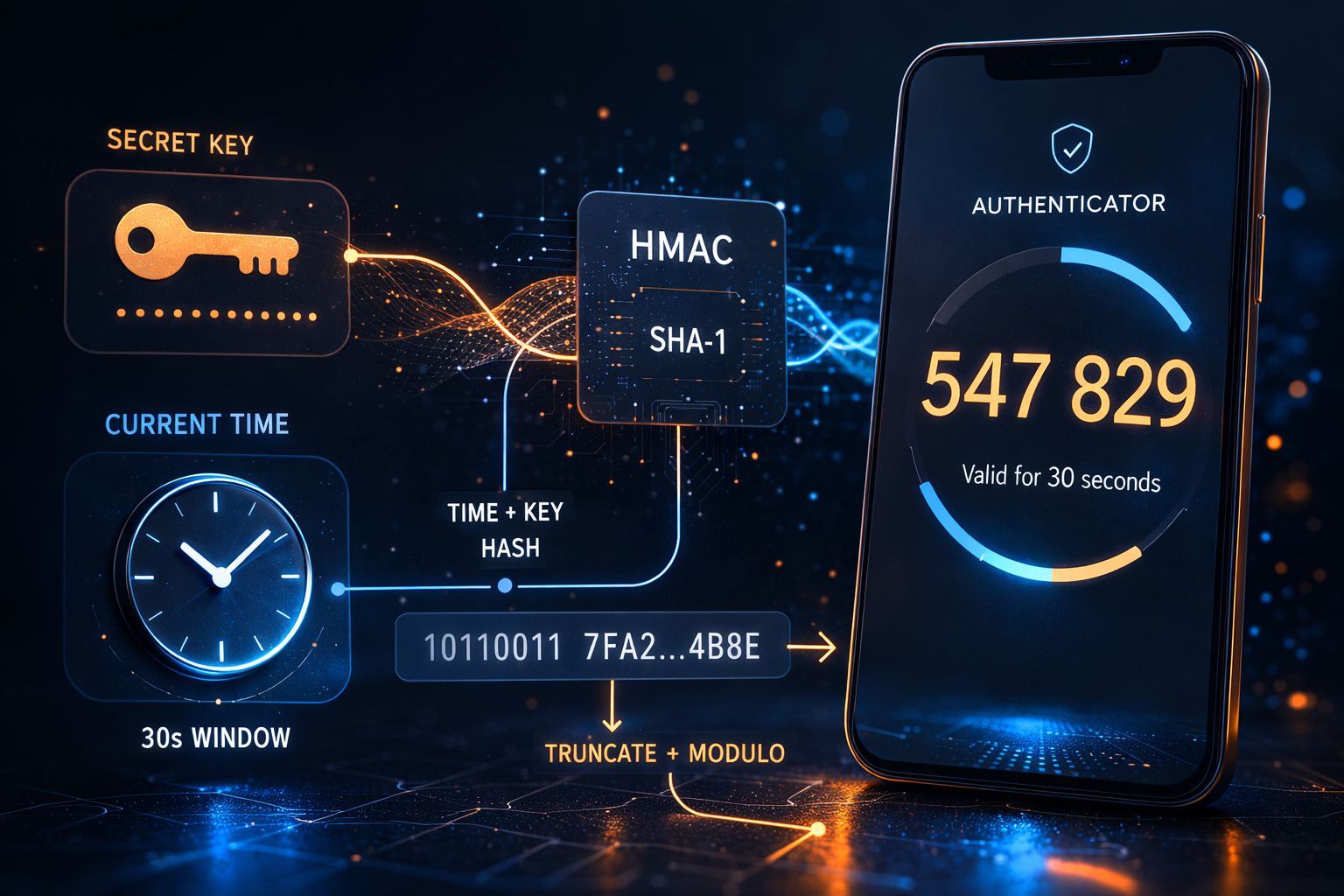
Why Do We Even Need a "Second Factor"?
Passwords on their own are brittle. People reuse them, attackers phish them, data breaches leak them, and brute-force attacks are still very real. The whole point of two-factor authentication (2FA) is to pair something you know (your password) with something you have (your phone or authenticator app).
So even if an attacker gets your password, they still need physical access to your device to produce the current OTP. And since that OTP rotates every 30 seconds, a stolen code has a very short shelf life.
What makes TOTP-based 2FA especially nice is that it works offline. Your authenticator app doesn't have to call home to some server. The app and the server both compute the same code independently from a shared secret and the current time. No SMS, no push, no network dependency. Just math.
Starting from the Foundation: HOTP
To understand TOTP properly, we first need HOTP — HMAC-based One-Time Password — defined in RFC 4226.
At a high level, HOTP is simple. You take a shared secret and a counter, run them through HMAC, and then squeeze the result into a number a human can actually type.
The HOTP Algorithm Step-by-Step
Here's the formula:
HOTP(K, C) = Truncate(HMAC-SHA1(K, C)) mod 10^d
Where:
- K = the shared secret key (a byte array)
- C = an 8-byte counter value (big-endian)
- d = the number of digits in the output (usually 6)
Let's walk through that one piece at a time.
Step 1: Counter to Bytes
The counter is a 64-bit integer, and the RFC wants it encoded as an 8-byte array in big-endian order. So if the counter is 5, the bytes look like this:
[0x00, 0x00, 0x00, 0x00, 0x00, 0x00, 0x00, 0x05]
Step 2: HMAC-SHA1
Next we compute HMAC, using the shared secret as the key and the counter bytes as the message. With SHA-1 underneath, that gives us a 20-byte (160-bit) output.
Formally, HMAC is defined as:
HMAC(K, text) = H((K' ⊕ opad) || H((K' ⊕ ipad) || text))
Here, ipad is 0x36 repeated, opad is 0x5c repeated, and K' is the key padded to the hash function's block size (64 bytes for SHA-1). If that formula looks a bit hostile, that's normal; in real code you let a crypto library handle it.
Step 3: Dynamic Truncation
This is the neat part. We have a 20-byte HMAC output, but what we actually want is a 6-digit code. RFC 4226 solves that with dynamic truncation:
- Take the last byte of the HMAC and look at its lowest 4 bits. That gives you an offset (0–15).
- Starting at that offset, grab 4 consecutive bytes.
- Mask off the most significant bit (to avoid sign issues), which leaves you with a 31-bit unsigned integer.
offset = hmac[19] & 0x0F

code = ((hmac[offset]     & 0x7F) << 24)
     | ((hmac[offset + 1] & 0xFF) << 16)
     | ((hmac[offset + 2] & 0xFF) << 8)
     |  (hmac[offset + 3] & 0xFF)
Step 4: Modulo
From there, it's straightforward: take that 31-bit integer modulo 10^digits, then pad with leading zeros if needed:
otp = code % 1000000 → "038314"
Visualizing the HOTP Flow
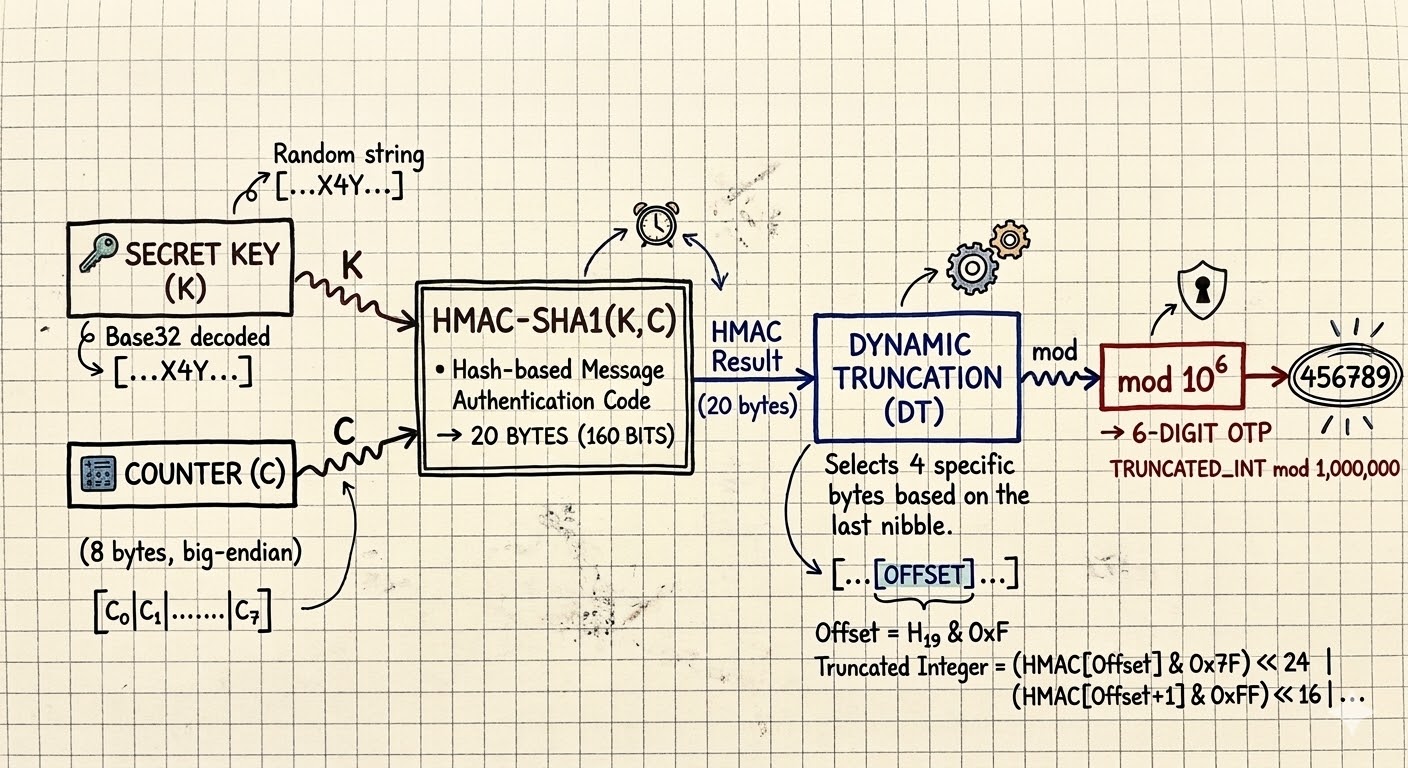
Diagram: HOTP Flow
flowchart LR
    K["🔑 Secret Key<br/>(Base32 decoded)"]
    C["🔢 Counter<br/>(8 bytes, big-endian)"]
    HMAC["HMAC-SHA1(K, C)<br/>→ 20 bytes"]
    DT["Dynamic Truncation<br/>→ 31-bit integer"]
    MOD["mod 10^6<br/>→ 6-digit OTP"]

    K --> HMAC
    C --> HMAC
    HMAC --> DT
    DT --> MOD
HOTP's Limitation: The Counter Sync Problem
HOTP works, but it comes with an annoying operational problem: both the client and the server have to keep a synchronized counter. Every time you generate a code, that counter moves forward. If you generate a code and don't use it, your device advances but the server doesn't. Now the two sides disagree.
Servers usually paper over this with a "look-ahead window" — they'll try C, C+1, C+2, and so on up to some limit. That works, but it's a little fragile. And a stolen HOTP code stays valid until it's used or the counter moves past it.
TOTP exists to get rid of exactly this headache.
Enter TOTP: Time as the Counter
TOTP (RFC 6238) is really just HOTP with one very good idea layered on top: instead of maintaining a counter, we derive the counter from the current time.
T = floor((CurrentUnixTime - T0) / TimeStep)
Where:
- CurrentUnixTime = seconds since the Unix epoch (1970-01-01 00:00:00 UTC)
- T0 = the reference time (usually 0, i.e., the epoch itself)
- TimeStep = how often the code changes (usually 30 seconds)
Once we have T, we just feed it into HOTP as the counter:
TOTP(K, T) = HOTP(K, T)
That's the whole trick. TOTP is basically "take HOTP, but make the counter come from time."
Why 30 Seconds?
Thirty seconds is a compromise between security and usability. Shorter windows, like 10 seconds, are stricter but don't leave humans much time to read and type the code. Longer windows, like 60 seconds, are friendlier but give an attacker more time to reuse a stolen code. RFC 6238 lands on 30 seconds because it's a pretty sensible middle ground.
Clock Drift Tolerance
Real devices don't keep perfect time, so a bit of clock drift is expected. To account for that, servers usually accept OTPs from the previous, current, and next time windows — effectively a 90-second acceptance window. That's usually enough to absorb minor drift without giving up much security.
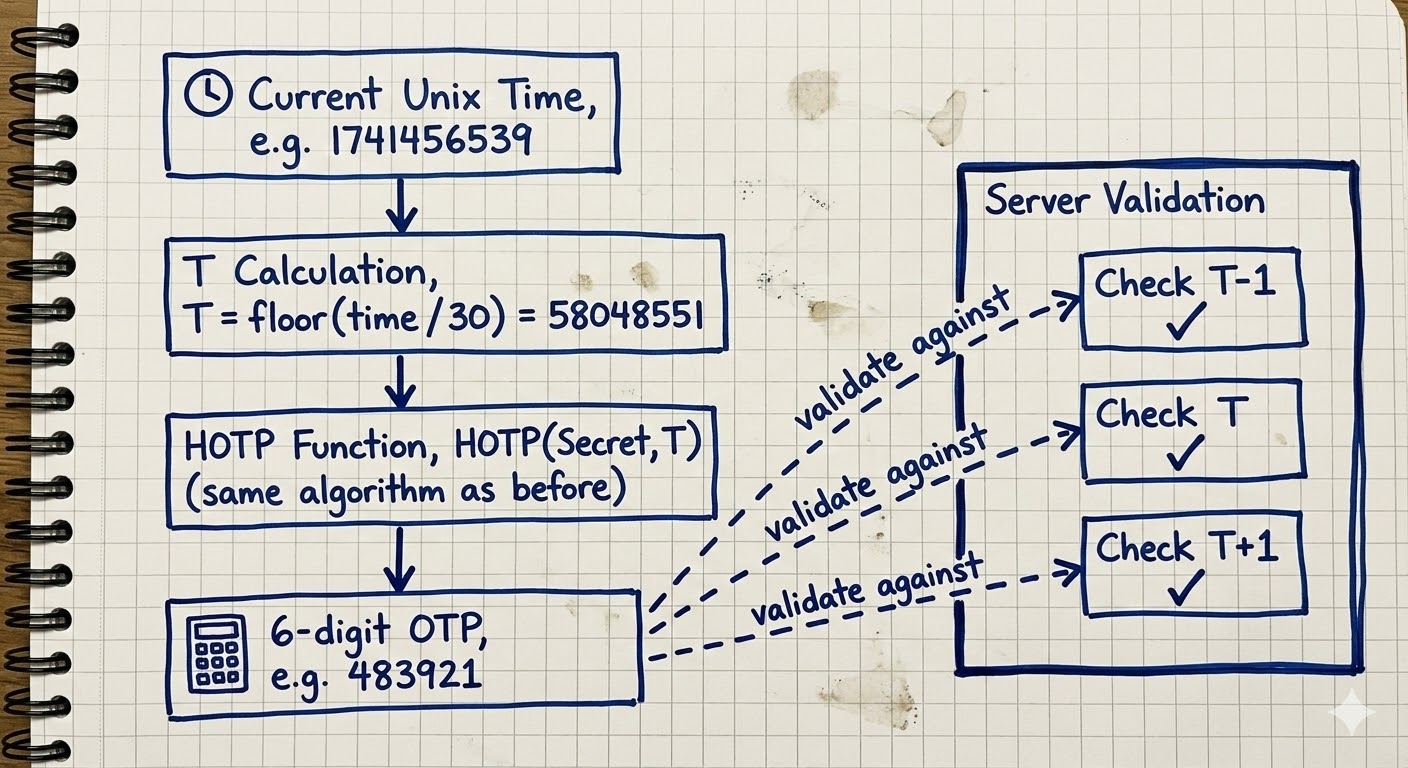
Diagram: TOTP Drift Tolerance
flowchart TD
    TIME["⏱️ Current Unix Time<br/>e.g. 1741456539"]
    CALC["T = floor(time / 30)<br/>= 58048551"]
    HOTP["HOTP(Secret, T)<br/>(same algorithm as before)"]
    OTP["🔢 6-digit OTP<br/>e.g. 483921"]

    TIME --> CALC
    CALC --> HOTP
    HOTP --> OTP

    subgraph Server Validation
        PREV["Check T-1 ✓"]
        CURR["Check T ✓"]
        NEXT["Check T+1 ✓"]
    end

    OTP -.->|"validate against"| PREV
    OTP -.->|"validate against"| CURR
    OTP -.->|"validate against"| NEXT
TOTP Supports More Hash Algorithms
While HOTP (RFC 4226) was specified with SHA-1 only, TOTP (RFC 6238) explicitly supports:
| Algorithm | HMAC Output | RFC 6238 Test Vectors |
|---|---|---|
| HMAC-SHA1 | 20 bytes | ✅ Yes |
| HMAC-SHA256 | 32 bytes | ✅ Yes |
| HMAC-SHA512 | 64 bytes | ✅ Yes |
The nice part is that dynamic truncation doesn't really care how large the hash output is. It still uses the last byte to find the offset, and it still extracts 4 bytes. The possible offset range also doesn't change: 4 bits means 0–15 whether the HMAC output is 20 bytes (SHA-1), 32 bytes (SHA-256), or 64 bytes (SHA-512).
In practice, almost every service still uses SHA-1. A few more security-conscious services — some crypto exchanges are a common example — switch to SHA-256 or SHA-512 for the larger HMAC output.
How TOTP Provisioning Works: QR Codes and otpauth:// URIs
When you turn on 2FA on a website, the flow usually looks like this under the hood:
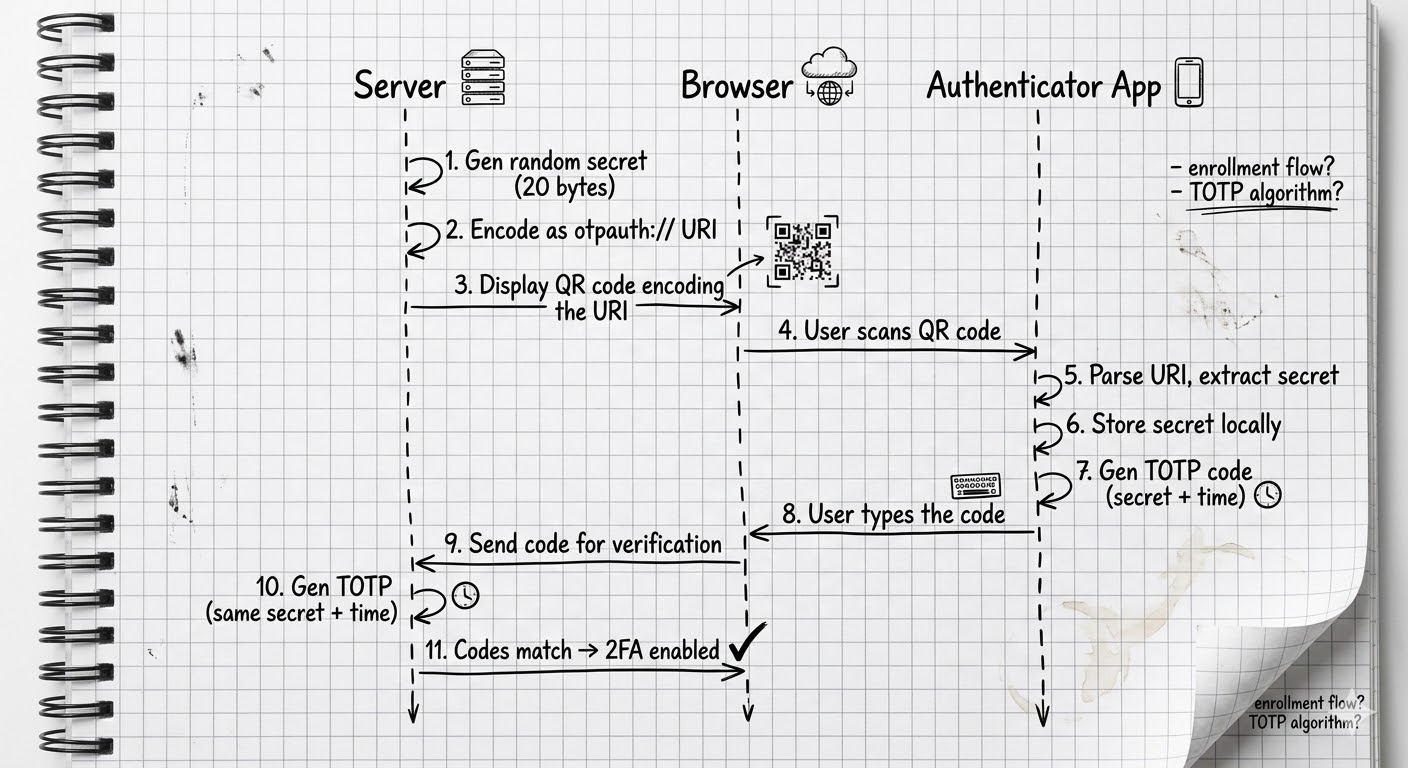
Diagram: TOTP Registration Flow
sequenceDiagram
    participant Server
    participant Browser
    participant App as Authenticator App

    Server->>Server: Generate random secret (e.g. 20 bytes)
    Server->>Server: Encode as otpauth:// URI
    Server->>Browser: Display QR code encoding the URI
    Browser->>App: User scans QR code
    App->>App: Parse otpauth:// URI, extract secret
    App->>App: Store secret locally
    App->>App: Generate TOTP code using secret + current time
    App->>Browser: User types the code
    Browser->>Server: Send code for verification
    Server->>Server: Generate TOTP with same secret + time
    Server->>Browser: Codes match → 2FA enabled ✅
Anatomy of an otpauth:// URI
The QR code encodes a URI in the otpauth:// format, formalized in the IETF draft draft-linuxgemini-otpauth-uri:
otpauth://totp/GitHub:[email protected]?secret=JBSWY3DPEHPK3PXP&issuer=GitHub&algorithm=SHA1&digits=6&period=30
Here's what each piece is doing:
| Component | Example | Description |
|---|---|---|
| Scheme | otpauth:// |
The URI scheme — tells the app this is an OTP credential |
| Type | totp |
Either totp or hotp |
| Label | GitHub:[email protected] |
The issuer and account, separated by : |
| secret | JBSWY3DPEHPK3PXP |
The shared secret, Base32-encoded (no padding) |
| issuer | GitHub |
The service name (displayed in the app) |
| algorithm | SHA1 |
Hash algorithm: SHA1, SHA256, or SHA512 (default: SHA1) |
| digits | 6 |
Number of digits: 6 or 8 (default: 6) |
| period | 30 |
TOTP time step in seconds (default: 30) |
| counter | (HOTP only) | Initial counter value for HOTP |
The secret parameter is the bit that really matters. It's the shared secret that both the server and your authenticator app use to independently generate matching codes. It's Base32-encoded because Base32 sticks to uppercase letters and digits 2–7, which makes it much less annoying to display and type by hand if QR scanning fails.
How Do Other Authenticator Apps Store Secrets?
While researching this post, I went down a fun rabbit hole on how different authenticator apps store OTP secrets and backups. The range is wild — everything from "barely encrypted" to "actually pretty solid":
Google Authenticator
Google Authenticator's history here is... not great. On Android, it originally stored secrets in a plaintext SQLite database with no encryption at all. If a device was rooted, anyone with access could read all the 2FA secrets directly. When Google added cloud sync in 2023, it initially transferred secrets without end-to-end encryption, which meant Google's servers could theoretically read them. They later added E2EE to cloud sync, but local storage on Android still depends on OS-level sandboxing rather than app-level encryption.
Microsoft Authenticator
Microsoft Authenticator is more serious about this stuff. On iOS, secrets live in the Keychain, and on Android they use encrypted shared preferences. Cloud backups are encrypted too: iCloud backups inherit Keychain protection, and Android backups go to Microsoft's servers with account-based encryption.
Authy (Twilio)
Authy was one of the first authenticator apps to offer cloud backup. Before upload, it encrypted secrets with a user-provided "backups password" (run through PBKDF2 or a similar KDF). The downside is that the app was proprietary and was sunset in 2024, with users told to migrate away. Also in 2024, Twilio disclosed a breach where phone numbers tied to Authy accounts were leaked, though not the secrets themselves.
1Password & Bitwarden
Both 1Password and Bitwarden treat TOTP secrets as just another field inside the encrypted vault. They use AES-256-GCM, with keys derived from your master password via PBKDF2 in Bitwarden and Argon2 in 1Password. So the OTP secret ends up protected the same way the rest of your vault item is. Both have also been independently audited and are open-source to varying degrees (Bitwarden fully, 1Password's crypto components partially).
2FAS
2FAS is fully open-source and keeps secrets encrypted on-device. It uses a user-provided password to derive the encryption key. Backups are encrypted files that you control yourself, with no mandatory cloud component. Their source code is available on GitHub, which is a big win for auditability.
Ente Auth
Ente Auth is another strong open-source option. Their cloud sync uses end-to-end encryption with XChaCha20-Poly1305, and the keys come from the user's password via Argon2. Their code is fully open-source and has been independently audited.
Summary Table
| App | Encryption at Rest | Cloud Backup | Backup Encryption | Open Source |
|---|---|---|---|---|
| Google Authenticator | OS sandbox only | Optional (Google) | E2EE (added later) | ❌ |
| Microsoft Authenticator | Keychain / EncryptedPrefs | iCloud/Microsoft | Account-based | ❌ |
| Authy | Encrypted | Yes (Twilio) | Password-based | ❌ |
| 1Password | AES-256-GCM | Yes (1Password) | Master password | Partial |
| Bitwarden | AES-256-GCM | Yes (Bitwarden) | Master password | ✅ |
| 2FAS | Encrypted | Optional (file) | Password-based | ✅ |
| Ente Auth | XChaCha20-Poly1305 | Yes (Ente) | E2EE (Argon2) | ✅ |
| TwoFac | AES-256-GCM | Optional (file) | Password-based (PBKDF2) | ✅ |
Diving Into Our Codebase
With the theory out of the way, let's look at how TwoFac actually wires this up. All of the OTP logic lives in our sharedLib module — the pure Kotlin Multiplatform library shared by every platform we target (Android, iOS, Desktop, Web, CLI, and Wear OS).
The Crypto Layer: cryptography-kotlin
We use cryptography-kotlin by whyoleg — specifically dev.whyoleg.cryptography v0.5.0 — for all of our cryptographic primitives. What I like about this library is that it wraps platform-native crypto providers instead of trying to reinvent them:
| Platform | Crypto Provider |
|---|---|
| JVM (Android, Desktop, Wear OS) | JDK (java.security / javax.crypto) |
| Native (iOS, macOS, Linux CLI) | OpenSSL 3 |
| Web (Wasm) | Web Crypto API |
So we're not shipping some homegrown crypto implementation. On each platform, we delegate to the battle-tested, OS-level crypto that's already available there. Here's what that dependency setup looks like in sharedLib/build.gradle.kts:
// commonMain
implementation(libs.crypto.kt.core)       // Core API

// jvmMain
implementation(libs.crypto.kt.jdk)        // → java.security / javax.crypto

// nativeMain (iOS, macOS, Linux)
implementation(libs.crypto.kt.openssl)    // → OpenSSL 3

// wasmJsMain (Web, Browser Extension)
implementation(libs.crypto.kt.web)        // → Web Crypto API
The CryptoTools Interface
All of the cryptographic operations sit behind a CryptoTools interface:
interface CryptoTools {
    enum class Algo { SHA1, SHA256, SHA512 }

    suspend fun hmacSha(algorithm: Algo, key: ByteString, data: ByteString): ByteString
    suspend fun createSigningKey(passKey: String, salt: ByteString? = null): SigningKey
    suspend fun encrypt(key: ByteString, secret: ByteString): ByteString
    suspend fun decrypt(encryptedData: ByteString, key: ByteString): ByteString
}
Notice that everything is a suspend fun. That's not just Kotlin style for the sake of style. On some platforms — WebCrypto being the obvious one — cryptographic operations are inherently asynchronous. Making the interface suspend-based lets us use those native async APIs cleanly without blocking.
The DefaultCryptoTools implementation then hooks that interface up to cryptography-kotlin:
class DefaultCryptoTools(val cryptoProvider: CryptographyProvider) : CryptoTools {

    val hmac = cryptoProvider.get(HMAC)

    override suspend fun hmacSha(
        algorithm: CryptoTools.Algo,
        key: ByteString,
        data: ByteString
    ): ByteString {
        val keyDecoder = when (algorithm) {
            CryptoTools.Algo.SHA1 -> hmac.keyDecoder(SHA1)
            CryptoTools.Algo.SHA256 -> hmac.keyDecoder(SHA256)
            CryptoTools.Algo.SHA512 -> hmac.keyDecoder(SHA512)
        }
        val hmacKey = keyDecoder.decodeFromByteString(HMAC.Key.Format.RAW, key)
        val signature = hmacKey.signatureGenerator().generateSignature(data.toByteArray())
        return ByteString(signature)
    }
}
The OTP Interface
Both HOTP and TOTP implement a shared OTP interface:
interface OTP {
    val digits: Int                      // 6 or 8
    val algorithm: CryptoTools.Algo      // SHA1, SHA256, SHA512
    val secret: String                   // Base32-encoded
    val accountName: String              // e.g. "[email protected]"
    val issuer: String?                  // e.g. "GitHub"

    suspend fun generateOTP(counter: Long): String
    suspend fun validateOTP(otp: String, counter: Long): Boolean
}
Our HOTP Implementation
The HOTP class is, for the most part, a straight RFC 4226 implementation:
class HOTP(
    override val digits: Int = 6,
    override val algorithm: CryptoTools.Algo = CryptoTools.Algo.SHA1,
    override val secret: String,
    override val accountName: String,
    override val issuer: String?,
) : OTP {

    private val cryptoTools = DefaultCryptoTools(CryptographyProvider.Default)

    override suspend fun generateOTP(counter: Long): String {
        // 1. Counter → 8 bytes (big-endian)
        val counterBytes = ByteArray(8) { i ->
            ((counter shr ((7 - i) * 8)) and 0xFF).toByte()
        }

        // 2. Decode the Base32 secret
        val secretBytes = Encoding.decodeBase32(secret)

        // 3. HMAC
        val hmac = cryptoTools.hmacSha(
            algorithm,
            ByteString(secretBytes),
            ByteString(counterBytes)
        )

        // 4. Dynamic Truncation
        val fourBytes = dynamicTruncate(hmac)

        // 5. Modulo → pad with zeros
        val otp = fourBytes % 10.0.pow(digits.toDouble()).toInt()
        return otp.toString().padStart(digits, '0')
    }
}
The dynamic truncation helper mirrors the RFC directly:
internal fun dynamicTruncate(hmac: ByteString): Int {
    // Last byte's lowest 4 bits = offset (0-15)
    val offset = (hmac.get(hmac.size - 1) and 0x0F).toInt()

    // Extract 4 bytes, mask the MSB for a 31-bit unsigned int
    return ((hmac.get(offset).toInt() and 0x7F) shl 24) or
           ((hmac.get(offset + 1).toInt() and 0xFF) shl 16) or
           ((hmac.get(offset + 2).toInt() and 0xFF) shl 8) or
            (hmac.get(offset + 3).toInt() and 0xFF)
}
One detail worth calling out: our dynamicTruncate uses hmac.size - 1 instead of hardcoding 19 the way many SHA-1-only examples do. That small choice is what makes the same implementation work correctly for SHA-256 (32 bytes) and SHA-512 (64 bytes) as well.
Our TOTP Implementation
The TOTP class ends up being refreshingly small because it mostly wraps HOTP:
class TOTP(
    override val digits: Int = 6,
    override val algorithm: CryptoTools.Algo = CryptoTools.Algo.SHA1,
    override val secret: String,
    override val accountName: String,
    override val issuer: String?,
    private val baseTime: Long = 0,    // Unix epoch
    val timeInterval: Long = 30        // 30 seconds
) : OTP {

    // Reuse HOTP internally!
    private val hotp = HOTP(digits, algorithm, secret, accountName, issuer)

    private fun timeToCounter(currentTime: Long): Long {
        return (currentTime - baseTime) / timeInterval
    }

    override suspend fun generateOTP(currentTime: Long): String {
        val counter = timeToCounter(currentTime)
        return hotp.generateOTP(counter)
    }

    override suspend fun validateOTP(otp: String, currentTime: Long): Boolean {
        val counter = timeToCounter(currentTime)
        // Check previous, current, and next windows (±1)
        return hotp.validateOTP(otp, counter - 1) ||
               hotp.validateOTP(otp, counter) ||
               hotp.validateOTP(otp, counter + 1)
    }
}
This is one of my favorite bits of the codebase. TOTP doesn't reimplement any crypto logic; it just turns time into a counter and hands the real work to HOTP. The validateOTP method then checks the ±1 time windows, which is the standard tolerance for clock drift.
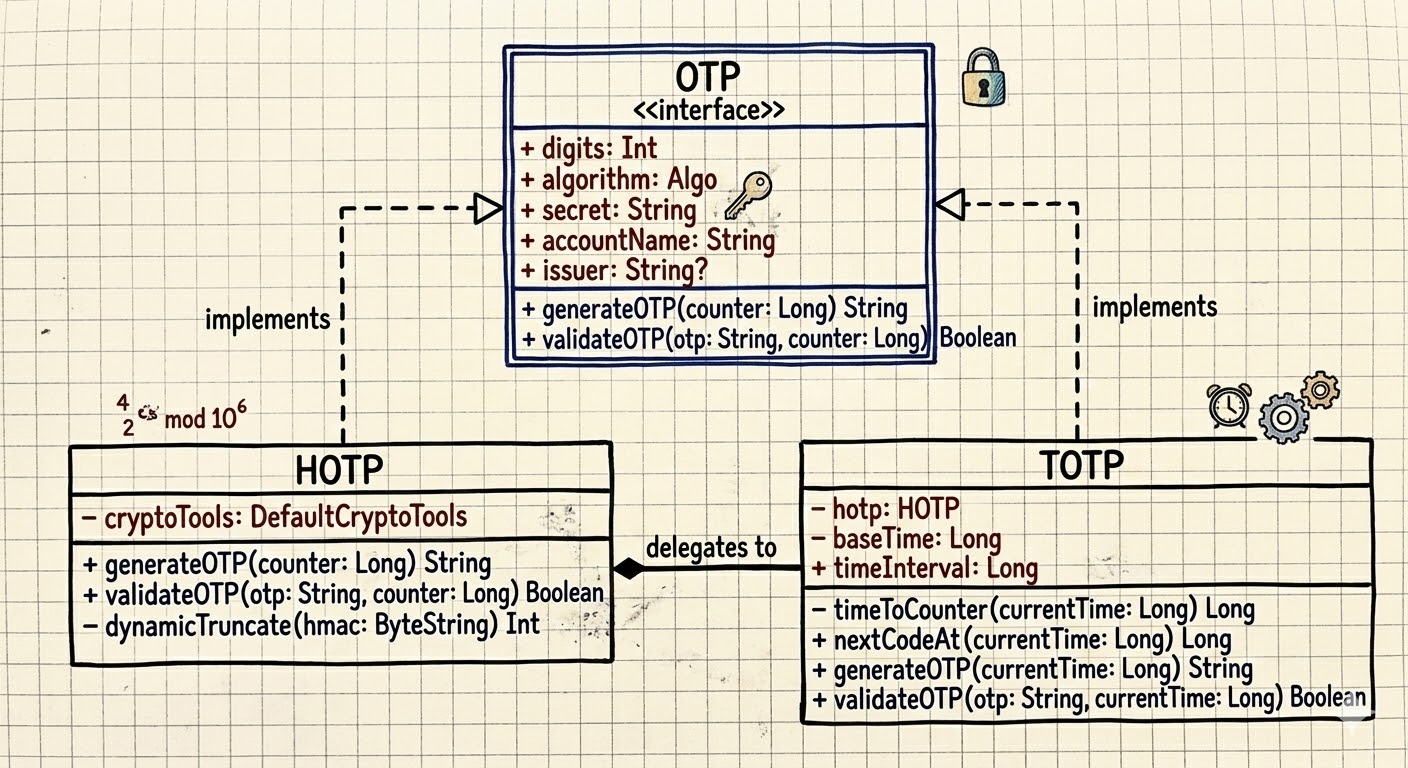
Diagram: TOTP and HOTP Class Structure
classDiagram
    class OTP {
        <<interface>>
        +digits: Int
        +algorithm: Algo
        +secret: String
        +accountName: String
        +issuer: String?
        +generateOTP(counter: Long) String
        +validateOTP(otp: String, counter: Long) Boolean
    }

    class HOTP {
        -cryptoTools: DefaultCryptoTools
        +generateOTP(counter: Long) String
        +validateOTP(otp: String, counter: Long) Boolean
        -dynamicTruncate(hmac: ByteString) Int
    }

    class TOTP {
        -hotp: HOTP
        -baseTime: Long
        +timeInterval: Long
        -timeToCounter(currentTime: Long) Long
        +nextCodeAt(currentTime: Long) Long
        +generateOTP(currentTime: Long) String
        +validateOTP(otp: String, currentTime: Long) Boolean
    }

    OTP <|.. HOTP
    OTP <|.. TOTP
    TOTP --> HOTP : delegates to
Parsing otpauth:// URIs
When you scan a QR code, the app needs to parse the otpauth:// URI and instantiate the right OTP object. That's what OtpAuthURI does:
object OtpAuthURI {
    fun parse(uri: String): OTP {
        require(uri.startsWith("otpauth://"))

        // Extract type: "totp" or "hotp"
        val typeStr = uri.substring(10, uri.indexOf("/", 10))

        // Extract label: "GitHub:[email protected]"
        val label = uri.substring(uri.indexOf("/", 10) + 1, uri.indexOf("?"))
        val labelIssuer = label.substringBefore(":", "")
        val accountName = label.substringAfter(":", label).trim()

        // Parse query parameters
        val params = paramsStr.split("&").associate { /* ... */ }

        val secret = params["secret"]!!
        val algorithm = when (params["algorithm"]?.uppercase()) {
            "SHA256" -> CryptoTools.Algo.SHA256
            "SHA512" -> CryptoTools.Algo.SHA512
            else -> CryptoTools.Algo.SHA1  // Default
        }

        return when (type) {
            Type.TOTP -> TOTP(
                digits = params["digits"]?.toIntOrNull() ?: 6,
                algorithm = algorithm,
                secret = secret,
                timeInterval = params["period"]?.toLongOrNull() ?: 30L,
                accountName = accountName,
                issuer = issuer
            )
            Type.HOTP -> HOTP(/* ... */)
        }
    }
}
The parser also has a Builder that does the reverse job: given an OTP object, it reconstructs the otpauth:// URI. We use that path when exporting or backing up accounts.
Base32 Encoding
OTP secrets inside the otpauth:// URI are Base32-encoded per RFC 4648. We have our own Base32 encoder/decoder in Encoding.kt:
object Encoding {
    const val ALPHABET = "ABCDEFGHIJKLMNOPQRSTUVWXYZ234567"

    fun decodeBase32(base32: String): ByteArray {
        val cleanInput = base32.replace("=", "").uppercase()
        // Each Base32 character represents 5 bits
        // We accumulate bits in a buffer and emit bytes when we have 8+
        var buffer = 0
        var bitsLeft = 0
        /* ... */
    }
}
Why Base32 and not Base64? Because Base32 stays in uppercase letters and digits 2–7, so you avoid messy visual ambiguity like 0/O, 1/l/I, and you also avoid symbols like + and /. That matters when a user has to type the secret manually because QR scanning failed.
How We Store OTP Accounts
Each OTP account is persisted as a StoredAccount:
@Serializable
data class StoredAccount(
    val accountID: Uuid,          // Unique identifier
    val accountLabel: String,     // Display name (e.g. "GitHub - alice")
    val salt: String,             // Salt for key derivation
    val encryptedURI: String,     // The otpauth:// URI, encrypted with AES-GCM
)
The key thing to notice is that we store the encrypted otpauth:// URI, not the raw secret. That entire URI — including the secret, algorithm, issuer, and other metadata — is encrypted with AES-256-GCM using a key derived from the user's password via PBKDF2. Each account gets its own salt.
So even if someone gets hold of the storage file, they still can't read the OTP secrets without the user's password. The details of that pipeline deserve their own post, though, so we'll get into PBKDF2, AES-GCM, and the accounts.json format next time.
Verifying Against the RFCs
One thing I'm particularly happy with is that the test suite validates against the official RFC test vectors. Here's a snippet from our HOTP tests:
// Secret: "12345678901234567890" (ASCII)
// Base32: "GEZDGNBVGY3TQOJQGEZDGNBVGY3TQOJQ"
val expectedOTPs = listOf(
    "755224", // Counter = 0
    "287082", // Counter = 1
    "359152", // Counter = 2
    "969429", // Counter = 3
    "338314", // Counter = 4
    "254676", // Counter = 5
    "287922", // Counter = 6
    "162583", // Counter = 7
    "399871", // Counter = 8
    "520489"  // Counter = 9
)
Those are the exact test vectors from RFC 4226 Appendix D. Our TOTP tests go a step further and validate against RFC 6238's test vectors for all three hash algorithms:
// RFC 6238 test vectors with 8-digit codes
RFC6238TestVector(59, "1970-01-01 00:00:59", key_sha1, SHA1, "94287082"),
RFC6238TestVector(59, "1970-01-01 00:00:59", key_sha256, SHA256, "46119246"),
RFC6238TestVector(59, "1970-01-01 00:00:59", key_sha512, SHA512, "90693936"),
// ... and more timestamps across decades
If the implementation matches the RFC test vectors on every platform we support (JVM, Native, and Wasm), we can be pretty confident we're computing OTPs correctly.
The Full Picture
Here's the end-to-end picture in TwoFac, from scanning a QR code all the way to showing the 6-digit code on screen:
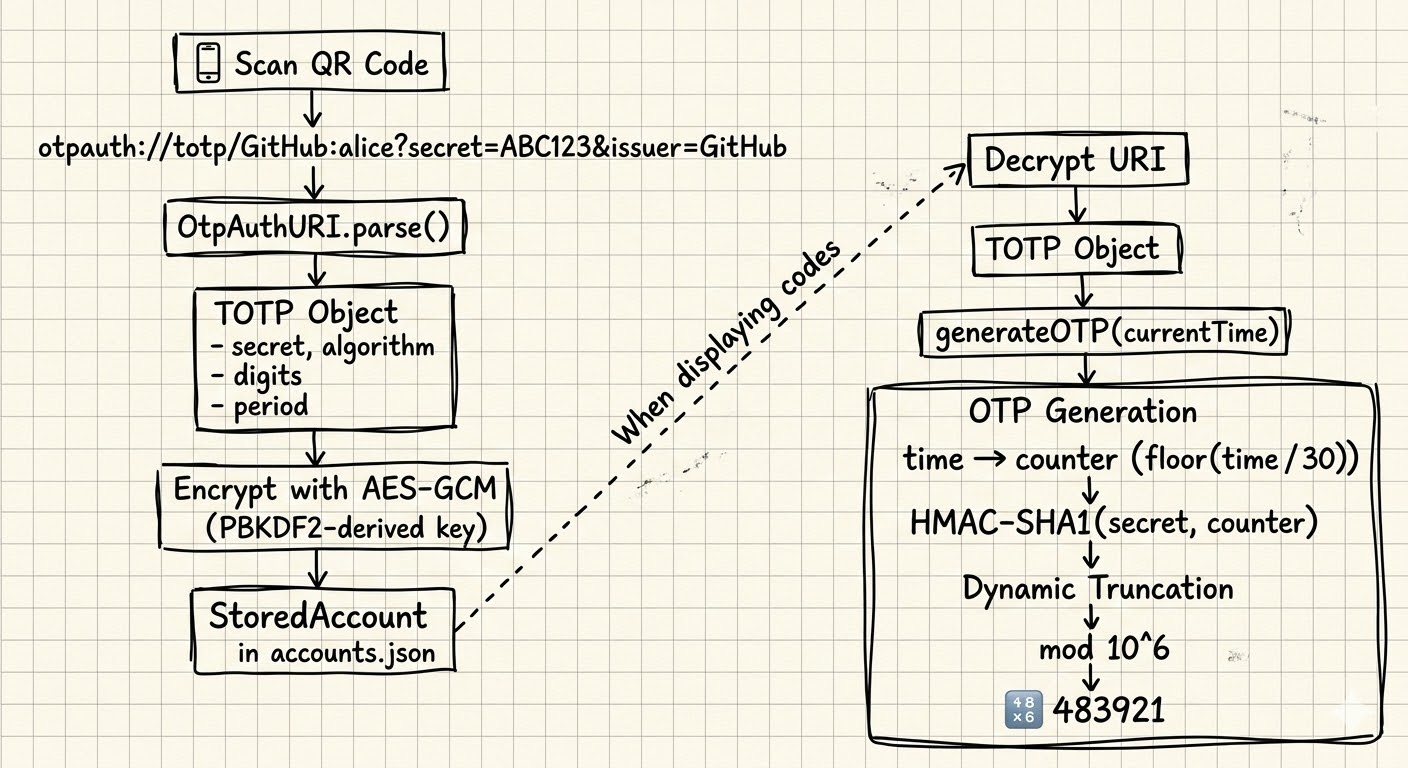
Diagram: TwoFac End-to-End Flow
flowchart TB
    QR["📱 Scan QR Code"]
    URI["otpauth://totp/GitHub:alice?secret=ABC123&issuer=GitHub"]
    PARSE["OtpAuthURI.parse()"]
    TOTP_OBJ["TOTP Object<br/>secret, algorithm, digits, period"]
    ENCRYPT["Encrypt with AES-GCM<br/>(PBKDF2-derived key)"]
    STORE["StoredAccount<br/>in accounts.json"]

    QR --> URI --> PARSE --> TOTP_OBJ
    TOTP_OBJ --> ENCRYPT --> STORE

    STORE -.->|"When displaying codes"| DECRYPT["Decrypt URI"]
    DECRYPT --> TOTP_OBJ2["TOTP Object"]
    TOTP_OBJ2 --> GEN["generateOTP(currentTime)"]

    subgraph OTP Generation
        GEN --> TIME["time → counter<br/>floor(time / 30)"]
        TIME --> HMAC["HMAC-SHA1(secret, counter)"]
        HMAC --> TRUNC["Dynamic Truncation"]
        TRUNC --> MOD["mod 10^6"]
        MOD --> CODE["🔢 483921"]
    end
What's Next?
In this post, we focused on the generation side of the problem — how a shared secret and the current time turn into those familiar 6-digit codes. But that's only half of the story.
In the next post, we'll switch to the storage side: how TwoFac protects secrets at rest with PBKDF2 for key derivation and AES-256-GCM for authenticated encryption. We'll walk through the accounts.json format, why we picked the iteration counts we did, and how the encryption pipeline works across all platforms.
Links and References
- TwoFac GitHub Repository
- RFC 4226 — HOTP: An HMAC-Based One-Time Password Algorithm
- RFC 6238 — TOTP: Time-Based One-Time Password Algorithm
- RFC 2104 — HMAC: Keyed-Hashing for Message Authentication
- RFC 4648 — Base Encodings (Base32)
- draft-linuxgemini-otpauth-uri — The otpauth URI Format
- Google Authenticator Key URI Format
- cryptography-kotlin by whyoleg
- NIST SP 800-38D — AES-GCM